 TurboDL
Getting started
TurboDL is a small program that runs in the background on your computer. It opens in its own window, like an application, using the Microsoft Edge or Google Chrome engine; without these browsers, it appears in a tab of your usual browser. The interface is served at http://127.0.0.1:9614, reachable only from your computer.
- Start TurboDL from its icon: its window opens automatically.
- Click Add, paste a link and click Download.
- The file arrives in
Downloads/TurboDL, sorted by type.
Installation
Download the package for your system from the download page, which details each step.
Windows
Run TurboDL-Setup.exe and click Yes: TurboDL installs in your personal folder, without administrator rights, with an icon on the Desktop and in the Start menu. On first launch, Windows SmartScreen may show “Windows protected your PC”: click More info, then Run anyway.
To uninstall it: Settings › Apps › Installed apps › TurboDL › Uninstall. Your downloaded files and settings are kept. A portable version (.zip) is also available, to run with no installation.
macOS
Drag TurboDL.app to Applications. On first launch, allow the application in System Settings › Privacy & Security › Open Anyway. If macOS says it is “damaged”, run xattr -cr /Applications/TurboDL.app in Terminal.
Linux
On Ubuntu, Debian or Linux Mint, install the .deb package (double-click, or sudo apt install ./turbodl_2.7.0_amd64.deb): TurboDL appears in the applications menu, and uninstalls with sudo apt remove turbodl. Elsewhere, extract the .tar.gz archive and run ./installer.sh, or ./turbodl directly. The extension is in /usr/share/turbodl/extension (.deb package) or in the extension folder of the archive.
The interface
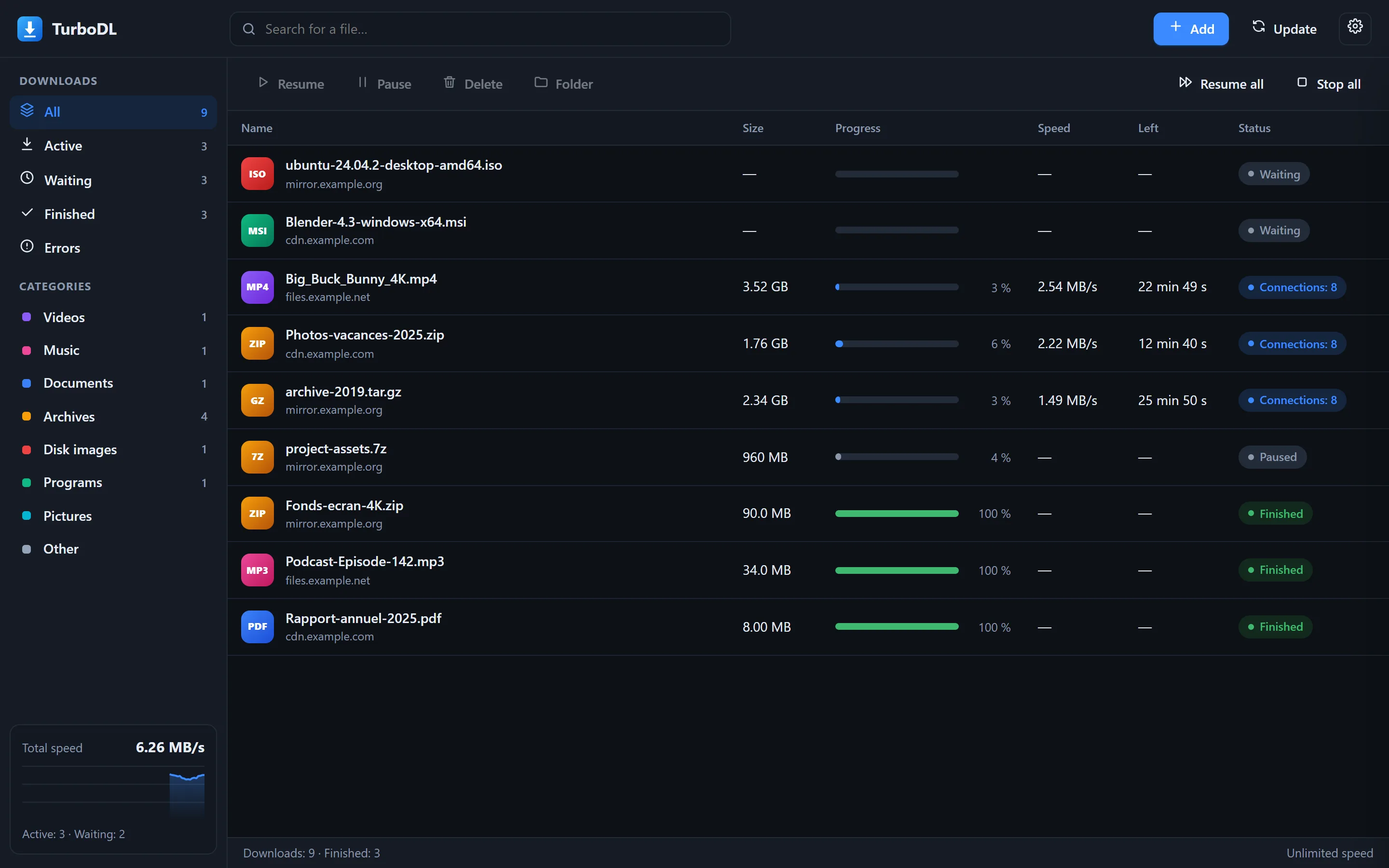
The main window, in dark theme.
- Sidebar: filter by state (active, waiting, finished, errors) or by category. Total speed appears at the bottom with its chart.
- List: a click selects a row, Ctrl + click or Shift + click selects several. A double-click opens the file if it is finished, or the details panel otherwise.
- Toolbar: resume, pause, delete, open the folder, or resume all and stop all at once.
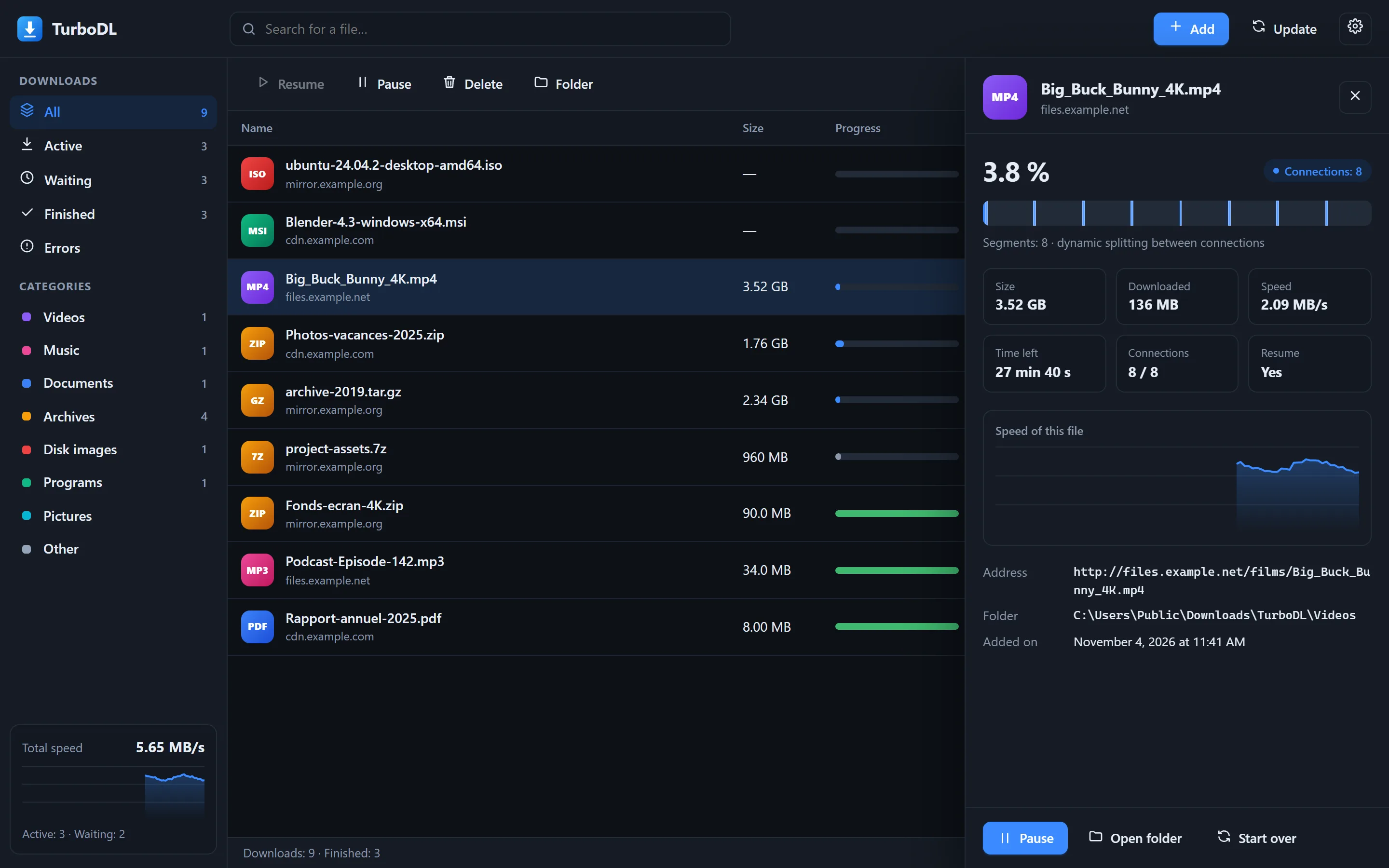
The details panel: segment map, speed, active connections.
The segment map shows how the file is shared between connections. Each blue block is a part already downloaded; when a connection finishes its piece, it takes over half of the largest remaining piece.
Adding links
Click Add. If a link is on your clipboard, it is pasted automatically.
- Several links: one per line, added all at once.
- File name and folder: optional. By default, TurboDL uses the name given by the server and sorts the file by type.
- Connections: 8 by default. Go up to 32 for slow servers, lower it if a server refuses multiple connections (TurboDL also adapts on its own).
- Torrents: paste a magnet link or the address of a .torrent file, or click .torrent file… to choose one on your computer. The whole content of the torrent is downloaded. If it contains several files, they arrive in a folder named after it.
- Later adds the file paused, without starting it.
Shortcut: Ctrl + Enter in the address box starts the download.
Formats and categories
TurboDL recognizes about 370 formats and puts each file in a subfolder of Downloads/TurboDL by type (can be turned off in Options › General). Unknown formats go to Other.
| Videos mp4, mkv, webm, avi, mov, wmv, flv, mpg, ts, m2ts, vob, 3gp, hevc, av1… and subtitles srt, ass, vtt, sub, kept with the videos | 70 |
| Music mp3, flac, aac, m4a, opus, ogg, wav, aiff, alac, ape, wma, ac3, dts, dsf, m4b (audiobooks), midi… | 67 |
| Documents pdf, doc(x), xls(x), ppt(x), odt, ods, odp, rtf, txt, md, epub, mobi, azw3, djvu, cbz, cbr… | 67 |
| Archives zip, rar, 7z, tar, gz, bz2, xz, zst, lz4, cab, lzh, multi-part archives (.001, .r00)… | 39 |
| Disk images iso, img, bin, nrg, mdf, vhd(x), vmdk, vdi, ova, qcow2, wim, esd… | 23 |
| Programs exe, msi, msix, appx, dmg, pkg, deb, rpm, snap, flatpak, AppImage, apk, xapk, aab, ipa, jar… | 39 |
| Pictures jpg, png, gif, webp, avif, heic, jxl, svg, psd, tiff, and raw photos cr2, cr3, nef, arw, dng, raf… | 65 |
1fichier and send.now
Paste the address of the file's page directly, for example https://1fichier.com/?abc123 or https://send.now/abc123def456.
With your account, automatically
If the extension is installed and you are signed in to 1fichier or send.now in your browser, there is nothing to do: the extension shares your session with TurboDL, which downloads with your account even when you paste a link directly into TurboDL. Options › Accounts shows “Browser session” when this is the case. You can turn off this sharing in the extension window.
With an API key (optional)
Open Options › Accounts and paste your API key:
- 1fichier: 1fichier.com › My account › Settings › API key.
- send.now: My Account › API key.
Click Check to test the key, then Save. TurboDL then gets the direct link through the host's official API and downloads over several connections. Keys stay on your computer: encrypted with Windows protection, or in a file only you can read on macOS and Linux. They are never displayed again.
Without a Premium account
1fichier: TurboDL follows the same steps as your browser and respects the countdown and the delay imposed between two free files. During this delay, the file shows “Host delay” and restarts automatically at the stated time. Free files use a single connection and cannot be resumed after a pause.
send.now without a session: open the page in your browser and click its download button; the extension then hands the file to TurboDL.
Browser extension
The extension for Chrome and Edge is supplied in the extension folder of each package.
- Open
chrome://extensions(oredge://extensions). - Turn on Developer mode, at the top right.
- Click Load unpacked and choose the
extensionfolder.
You then get:
- “Download with TurboDL” in the right-click menu on links, images, videos and sounds;
- automatic capture of browser downloads when TurboDL is running (can be turned off from the extension icon);
- sharing of your cookies for the site concerned, so that downloads requiring sign-in work;
- sharing of your 1fichier and send.now session, to download with your account without an API key (can be turned off in the extension window).
By default, TurboDL asks you to confirm each link received. You can turn this off in Options › Browser.
Options
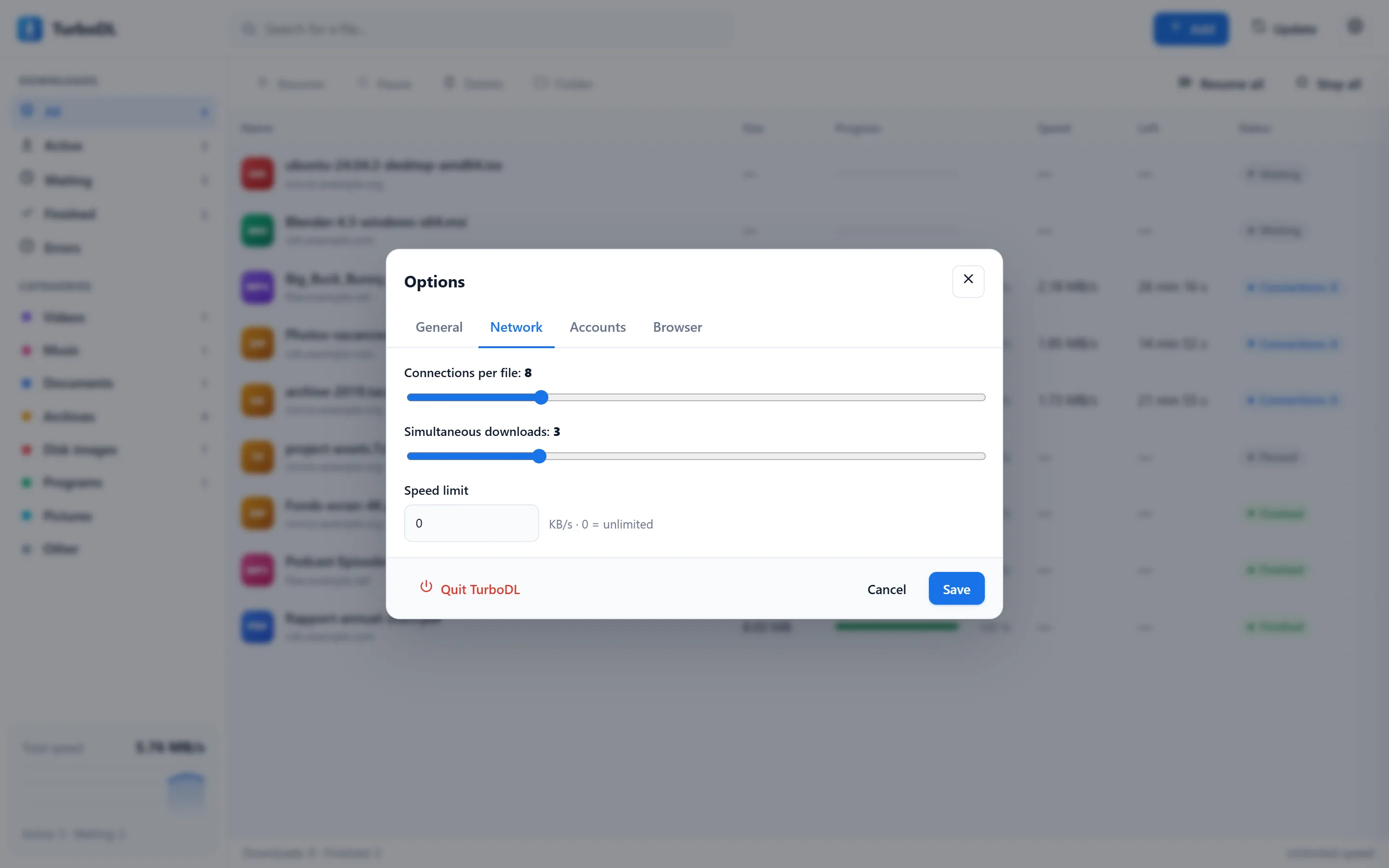
The Network tab of the options.
- General: language, download folder, sorting by category, opening at startup, display in its own window or in a tab.
- Network: connections per file (1 to 32), simultaneous downloads (1 to 10), overall speed limit in KB/s (0 = unlimited).
- Accounts: browser session status, and 1fichier and send.now API keys (optional).
- Browser: confirmation of links sent by the extension.
To quit TurboDL: Options › Quit TurboDL. Active downloads will resume next time it starts.
Keyboard shortcuts
| Open the details of the selected file | Enter |
| Remove the selection from the list | Del |
| Select all | Ctrl + A |
| Close a window or panel | Esc |
| Start the download from the add window | Ctrl + Enter |
On Mac, use ⌘ instead of Ctrl.
Command line
TurboDL accepts a few options at startup, handy on Linux or on a server:
With --get, API keys can be supplied through the environment variables TURBODL_1FICHIER_KEY and TURBODL_SENDNOW_KEY.
Updating
TurboDL checks for a new version at startup, then every 5 minutes. When it finds one, the button at the top of the window turns green and shows Update available with the number. Nothing is installed without your consent.
- Click Update: the new version, what's new and its size are shown.
- Click Update in that window: TurboDL downloads the package for your system and checks its SHA-256 fingerprint.
- TurboDL restarts on its own and the page reloads. Your settings are kept and downloads in progress resume where they were.
.deb package: the program is in /usr/bin, which TurboDL cannot change on its own. It therefore saves the new package in your download folder and opens it in the software manager. Install it, then restart TurboDL.Uninstalling
- Windows: Settings › Apps › TurboDL › Uninstall. For the portable version, simply delete its folder.
- macOS: quit TurboDL, then drag
TurboDL.appto the Trash. - Linux, .deb package:
sudo apt remove turbodl. - Linux, .tar.gz archive: delete
~/.local/bin/turbodl,~/.local/share/applications/turbodl.desktopand~/.local/share/icons/hicolor/256x256/apps/turbodl.png.
Your downloaded files and settings stay in place. To erase everything, also delete the configuration folder given on the Privacy page.
Troubleshooting
The interface does not open
Open http://127.0.0.1:9614 yourself in your browser. If another program already uses this port, start TurboDL with --port 9700.
A download shows an error
Hover over the status to read the message. “HTTP 404” means the file no longer exists at this address; “HTTP 403” means the server refuses access (expired link, sign-in required: go through the extension to share your cookies). Click Resume to try again.
The download is not any faster
Your Internet connection may already be saturated, or the server may accept only one connection (the details panel shows this). Also check that no speed limit is set in the options.
“Host delay” on a 1fichier link
1fichier imposes a wait between two free downloads from the same IP address. TurboDL restarts the file automatically at the time shown. A Premium key removes this delay.
Starting from scratch
Open the file's details and click Start over: the part already downloaded is deleted and the download restarts from the beginning.